给真实文件用的 harness。
模型负责思考;kit 让它能看、改、运行、检查和撤销一个真实文件。
一个 kit 就是遵循 KHP 工具约定的 MCP 服务器,任何支持 MCP 的 agent 都能用任何 kit。
Scene 0.1.0:参考实现里的3D 场景 kit,由协议的维护者开发。声明的等级是 basic。
调用记录
- scene_inspect (Still life.kscene, preview: true, target: {"view":"camera"}, maxSize: 1200) ok Opened `Still life.kscene`: 1920 × 1080
- scene_commands (Still life.kscene, query: "material keyframe parent") ok No command has every word of `material keyframe parent`; 30 have some of them; showing the best 12.
- scene_run (Still life.kscene, [material.set, add.icoSphere, material.assign, add.empty, object.parent, anim.insertKey, object.transform, anim.insertKey, anim.setInterpolation]) ok Ran 9 commands on `Still life.kscene` (saved): 1920 × 1080
- scene_check (Still life.kscene) ok Checked `Still life.kscene`: no errors, no warnings, 1 note.
- scene_inspect (Still life.kscene, preview: true, target: {"view":"camera"}, maxSize: 1200) ok Opened `Still life.kscene`: 1920 × 1080
- scene_inspect (Still life.kscene, preview: true, target: {"range":[0,3.75],"frames":6}, maxSize: 1200) ok Opened `Still life.kscene`: 1920 × 1080
预览
01 打开这个场景:对象、材质、灯光和摄像机以 JSON 列出,再加上 kit 渲染出来的摄像机视角。
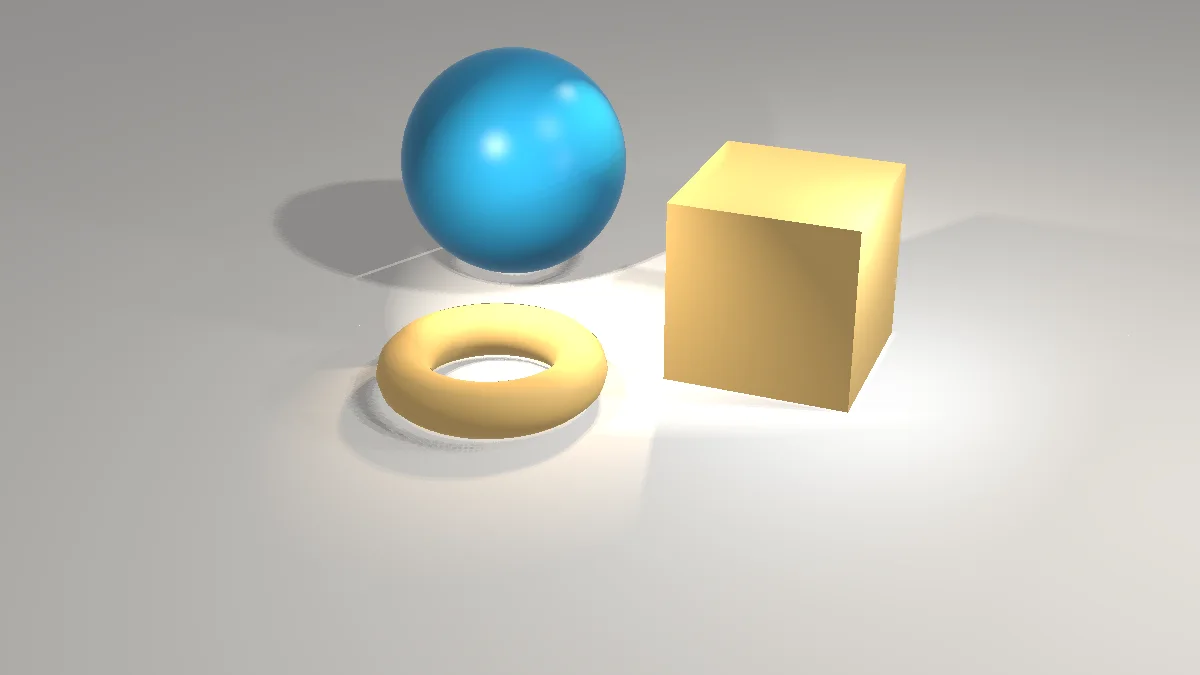
02 在命令目录里搜索材质、父子关系和关键帧的命令。
scene_commands(Still life.kscene, query: "material keyframe parent") · 5 找到
- object.parent Parent Parents `objects` (names or ids; the selection without it) to `parent`, keeping their world transform.
- object.clearParent Clear Parent Clears the parent of `objects` (names or ids; the selection without it), keeping their world transform.
- object.parentArmature Parent to Armature Parents `objects` (names or ids; the selection without it) to `armature` with automatic, envelope or empty weights.
- material.new New Material Creates a material with base color, metallic and roughness and answers its id.
- material.set Change Material Changes material `material` (name or id): base color, metallic, roughness, emission, alpha, transmission and more.
03 要求是:把球改成有光泽的珊瑚红,加一颗小的多面体石子,再把物体放到一个四秒转一圈的转台上。这个 kit 不保留草稿,修改直接写进文件,只保存一次。
scene_run → 9 steps · saved
✓ material.set ✓ add.icoSphere ✓ material.assign ✓ add.empty ✓ object.parent ✓ anim.insertKey ✓ object.transform ✓ anim.insertKey ✓ undefined
changes: 2 created, 5 changed
04 检查场景。
scene_check → 1 note
scene.unusedMaterial: Material Material is not used by any object → fix: material.delete
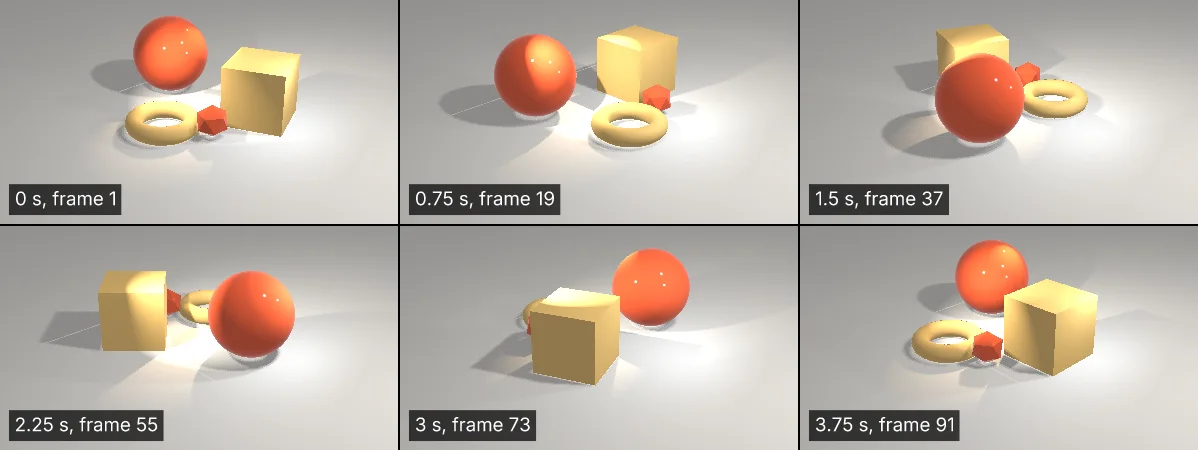
05 再从摄像机看一遍。这段视频是转台转动的 48 张预览,每隔一帧一张,都由 kit 渲染。
06 看运动:从四秒的转动里取六帧,由 kit 画成一张图。
调用记录
- scene_inspect (Still life.kscene, preview: true, target: {"view":"camera"}, maxSize: 1200) ok Opened `Still life.kscene`: 1920 × 1080
- scene_commands (Still life.kscene, query: "material keyframe parent") ok No command has every word of `material keyframe parent`; 30 have some of them; showing the best 12.
- scene_run (Still life.kscene, [material.set, add.icoSphere, material.assign, add.empty, object.parent, anim.insertKey, object.transform, anim.insertKey, anim.setInterpolation]) ok Ran 9 commands on `Still life.kscene` (saved): 1920 × 1080
- scene_check (Still life.kscene) ok Checked `Still life.kscene`: no errors, no warnings, 1 note.
- scene_inspect (Still life.kscene, preview: true, target: {"view":"camera"}, maxSize: 1200) ok Opened `Still life.kscene`: 1920 × 1080
- scene_inspect (Still life.kscene, preview: true, target: {"range":[0,3.75],"frames":6}, maxSize: 1200) ok Opened `Still life.kscene`: 1920 × 1080
预览
01 打开这个场景:对象、材质、灯光和摄像机以 JSON 列出,再加上 kit 渲染出来的摄像机视角。
02 在命令目录里搜索材质、父子关系和关键帧的命令。
scene_commands(Still life.kscene, query: "material keyframe parent") · 5 找到
- object.parent Parent Parents `objects` (names or ids; the selection without it) to `parent`, keeping their world transform.
- object.clearParent Clear Parent Clears the parent of `objects` (names or ids; the selection without it), keeping their world transform.
- object.parentArmature Parent to Armature Parents `objects` (names or ids; the selection without it) to `armature` with automatic, envelope or empty weights.
- material.new New Material Creates a material with base color, metallic and roughness and answers its id.
- material.set Change Material Changes material `material` (name or id): base color, metallic, roughness, emission, alpha, transmission and more.
03 要求是:把球改成有光泽的珊瑚红,加一颗小的多面体石子,再把物体放到一个四秒转一圈的转台上。这个 kit 不保留草稿,修改直接写进文件,只保存一次。
scene_run → 9 steps · saved
✓ material.set ✓ add.icoSphere ✓ material.assign ✓ add.empty ✓ object.parent ✓ anim.insertKey ✓ object.transform ✓ anim.insertKey ✓ undefined
changes: 2 created, 5 changed
04 检查场景。
scene_check → 1 note
scene.unusedMaterial: Material Material is not used by any object → fix: material.delete
05 再从摄像机看一遍。这段视频是转台转动的 48 张预览,每隔一帧一张,都由 kit 渲染。
06 看运动:从四秒的转动里取六帧,由 kit 画成一张图。
调用记录
- motion_inspect (Concert title.kmotion, preview: true, target: {"range":[0,3.9],"frames":6}, maxSize: 1200) ok Opened `Concert title.kmotion`: 1280 × 720
- motion_commands (Concert title.kmotion, query: "text preset") ok 2 commands have every word of `text preset`, 61 more some of them; showing the best 12.
- motion_run (Concert title.kmotion, draft: true, [layer.applyTextPreset, layer.setText, layer.applyTextPreset]) ok Ran 3 commands on your draft of `Concert title.kmotion`; the file is unchanged until the person merges the draft.
- motion_check (Concert title.kmotion, draft: true) ok Checked your draft of `Concert title.kmotion`: no errors, no warnings, 3 notes.
- motion_inspect (Concert title.kmotion, preview: true, draft: true, target: {"range":[0,3.9],"frames":6}, maxSize: 1200) ok Opened your draft of `Concert title.kmotion`: 1280 × 720
- motion_export (Concert title.kmotion, draft: true, format: "mp4", to: "after.mp4") ok Exported your draft of `Concert title.kmotion` as MP4 to `after.mp4` (446953 bytes).
- motion_draft_ready (Concert title.kmotion) ok Your draft of `Concert title.kmotion` is ready for review; the person will merge or discard it.
预览
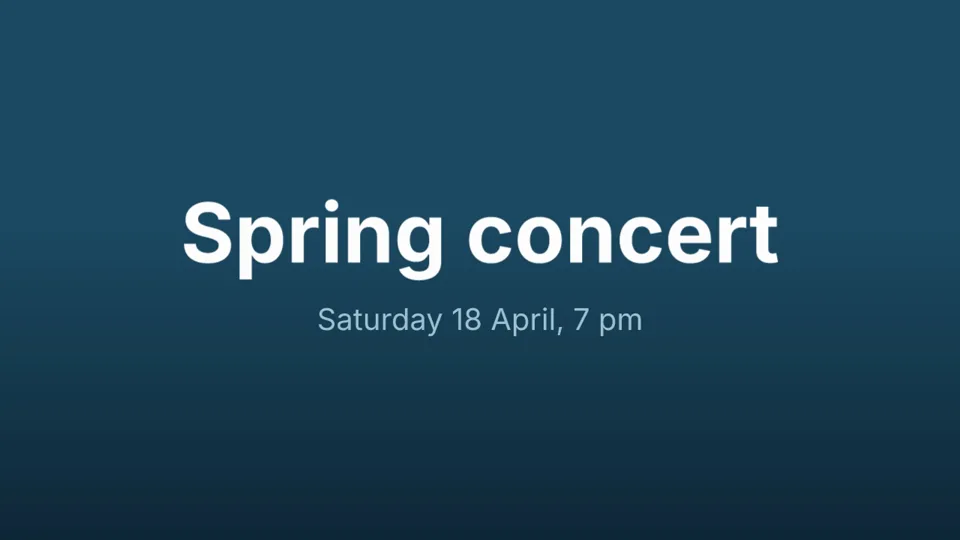
01 打开这个项目:合成和图层以 JSON 列出,每个都有 id,再加上 kit 渲染的四秒里的六帧。视频是 kit 自己导出的当前项目。
02 在命令目录里搜索文字动画的命令。
motion_commands(Concert title.kmotion, query: "text preset") · 5 找到
- layer.applyTextPreset Apply Text Animation Preset Applies a built-in text animation to a text `layer`: `preset` typewriter, fadeUpCharacters, bounceInWords, trackingIn, scramble, blurIn,…
- text.presets Text Animation Presets Lists the built-in text animation presets (id, name, description) layer.applyTextPreset accepts, the promo presets included.
- anim.browsePresets Browse Presets Editor window only: opens the animation preset browser.
- paint.brushPreset Brush Preset Chooses a brush preset for later paint strokes by index or name (`preset`); without `preset` returns the preset names.
- paint.presets Brush Presets Lists the brush presets with index, name, diameter, angle, roundness, hardness and spacing.
03 要求是:给标题加一个出场动画,改日期并用琥珀色显示,让日期在标题之后出现。写进草稿。
motion_run → 3 steps · draft
✓ layer.applyTextPreset ✓ layer.setText ✓ layer.applyTextPreset
changes: 3 changed
− motion.static-text (resolved)
− motion.static-text (resolved)
04 检查草稿。
motion_check → 3 notes
motion.flat-background: The frame is flat (one colour or a linear gradient, no radial light or vignette), which reads as plain; a radial ramp of the background's own colour, lighter behind the subject, gives it depth. → fix: effect.apply
motion.no-depth: No element has a glow or a shadow ("Date", "Title"), so everything sits flat on the background; a soft outer glow sized for the frame lifts them. → fix: layer.style.add
motion.thin-type: "Date" is set in a light or regular weight, which reads faint on video; use Medium or heavier. → fix: layer.setText
05 看草稿的六帧:标题一个词一个词地从模糊中升起,日期随后出现。
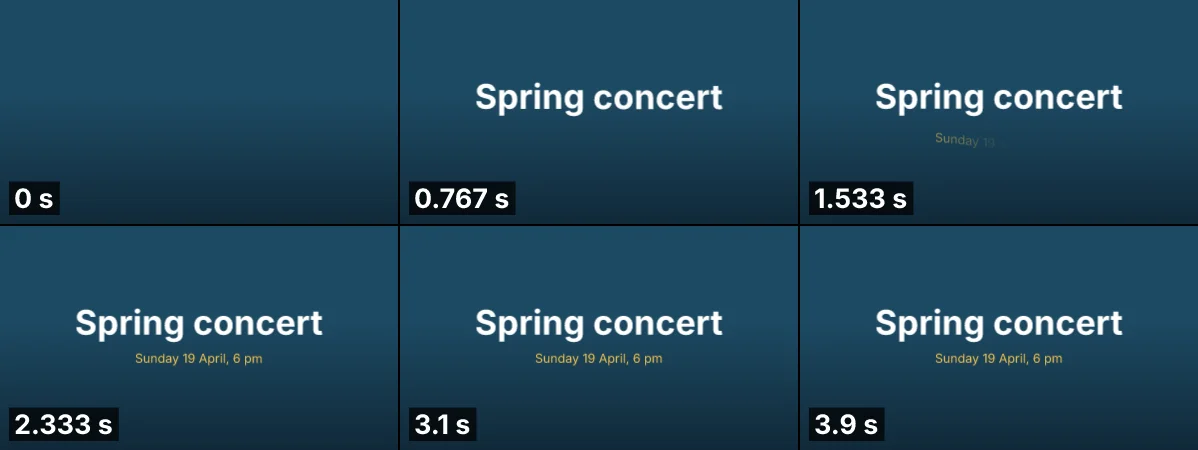
06 把草稿导出成视频:kit 渲染每一帧。这里播放的就是这段视频。
07 把草稿交给人,由人合并或丢弃。

motion_draft_ready → ready
Your draft of `Concert title.kmotion` is ready for review; the person will merge or discard it.
调用记录
- photo_inspect (Hills at dusk.psd, preview: true, maxSize: 1200) ok Opened `Hills at dusk.psd`: 1200 x 800 px, Rgb, 8-bit, 7 layers
- photo_commands (Hills at dusk.psd, query: "hue saturation adjustment layer") ok 4 commands have every word of `hue saturation adjustment layer`, 492 more some of them; showing the best 12.
- photo_run (Hills at dusk.psd, draft: true, [layer.newAdjustmentLayer.hueSaturation, image.crop, type.create]) ok Ran 3 commands on your draft of `Hills at dusk.psd`; the file is unchanged until the person merges the draft.
- photo_check (Hills at dusk.psd, draft: true) ok Checked your draft of `Hills at dusk.psd`: the kit found nothing wrong.
- photo_inspect (Hills at dusk.psd, draft: true, preview: true, maxSize: 1200) ok Opened your draft of `Hills at dusk.psd`: 1200 x 675 px, Rgb, 8-bit, 9 layers
- photo_draft_ready (Hills at dusk.psd) ok Your draft of `Hills at dusk.psd` is ready for review; the person will merge or discard it.
预览
01 打开这张图:图层以 JSON 列出,每个都有 id,再加上 kit 渲染出来的画面。

02 在命令目录里搜索一种调整:改变颜色,但不改动下面的图层。
photo_commands(Hills at dusk.psd, query: "hue saturation adjustment layer") · 5 找到
- layer.newAdjustmentLayer.hueSaturation Hue/Saturation… Adds an editable Hue/Saturation adjustment layer above the active layer, which shifts `hue` (−180–180), `saturation` and `lightness` for…
- image.adjustments.hueSaturation Hue/Saturation… Hue/Saturation on the active pixel layer (inside the selection), destructively: shifts `hue` (−180–180), `saturation` and `lightness` for…
- layer.newAdjustmentLayer.vibrance Vibrance… Adds an editable Vibrance adjustment layer above the active layer, which raises saturation mostly in muted colors and protects skin tones…
- image.adjustments.vibrance Vibrance… Vibrance on the active pixel layer (inside the selection), destructively: raises saturation mostly in muted colors and protects skin tones…
- image.adjustments.replaceColor Replace Color… Selects pixels near `color` within `fuzziness` (0–200) and shifts their `hue`, `saturation` and `lightness`; destructive.
03 要求是:做一个清冷的早晨版本,裁成 16:9,加上标题。调整图层改变颜色,之后还能再改;然后裁剪、加标题。全部写进草稿。
photo_run → 3 steps · draft
✓ layer.newAdjustmentLayer.hueSaturation ✓ image.crop ✓ type.create
changes: 2 created, 7 changed
04 检查草稿。
photo_check → 没有诊断
05 再看一遍现在渲染出来的画面。

06 把草稿交给人,由人合并或丢弃。图层在 .psd 里仍然可以编辑。
photo_draft_ready → ready
Your draft of `Hills at dusk.psd` is ready for review; the person will merge or discard it.
调用记录
- slide_inspect (Project update.pptx, target: {"slide":3}, preview: true) ok Opened `Project update.pptx`: 4 slides, 960 × 540 pt
- slide_commands (Project update.pptx, query: "chart data theme") ok No command has every word of `chart data theme`; 23 have some of them; showing the best 12.
- slide_run (Project update.pptx, draft: true, [chart.data, design.theme]) diagnostics Ran 2 commands on your draft of `Project update.pptx`; the file is unchanged until the person merges the draft.
- slide_check (Project update.pptx, draft: true) diagnostics Checked your draft of `Project update.pptx`: no errors, 2 warnings, no notes.
- slide_run (Project update.pptx, draft: true, [design.fonts]) ok Ran 1 commands on your draft of `Project update.pptx`; the file is unchanged until the person merges the draft.
- slide_inspect (Project update.pptx, target: {"slide":3}, draft: true, preview: true) ok Opened your draft of `Project update.pptx`: 4 slides, 960 × 540 pt
- slide_draft_ready (Project update.pptx) ok Your draft of `Project update.pptx` is ready for review; the person will merge or discard it.
预览
01 打开这份幻灯片,看第 3 页:形状以 JSON 列出,每个都有稳定的 id,再加上 kit 渲染出来的这一页。
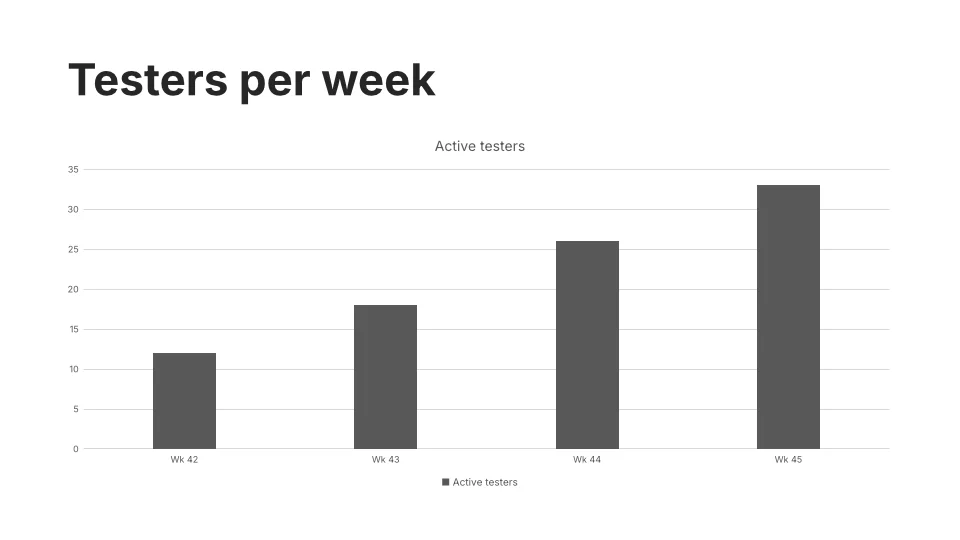
02 在 kit 的命令目录里搜索图表数据和主题的命令,而不是为每个命令加载一个工具。
slide_commands(Project update.pptx, query: "chart data theme") · 5 找到
- chart.data Edit Data Replaces the categories and series values (and any series color, type or waterfall totals given) of chart `id` (else the selected chart).
- chart.type Change Chart Type Changes the chart `id` (else the selected chart) to another chart type, keeping its data; an unknown type is refused.
- chart.options Chart Elements Sets which chart elements show (title, legend position, data labels, gridlines), the colour palette (colorful1–4, monochrome1–13; others…
- drawing.chart Change Chart Changes a chart drawing object's kind, title, legend, data labels or data.
- design.theme Themes Applies a theme by name (see `design.themes`) to the whole presentation.
03 给图表加上本周的数据,换成 Harbor 主题,都写进草稿:在有人合并之前文件不变。返回结果里已经报告了新的诊断。
slide_run → 2 steps · draft
✓ chart.data ✓ design.theme
changes: 8 changed
+ slide.font-substituted
+ slide.font-substituted
04 检查草稿。kit 没有 Harbor 主题用的字体,幻灯片会用替代字体绘制。每条发现都有稳定的编码。
slide_check → 2 warnings
slide.font-substituted: The font "Merriweather" is not available here; its text is drawn with "Inter", so its lines may wrap differently, and apps without it substitute their own font; use an installed family for the same look everywhere.
slide.font-substituted: The font "Open Sans" is not available here; its text is drawn with "Inter", so its lines may wrap differently, and apps without it substitute their own font; use an installed family for the same look everywhere.
05 保留 Harbor 的配色,换成 kit 有的字体。返回结果说两条警告都已解决。
slide_run → 1 steps · draft
✓ design.fonts
changes: 8 changed
− slide.font-substituted (resolved)
− slide.font-substituted (resolved)
06 再看一遍现在渲染出来的这一页:五周的数据,新主题的配色。
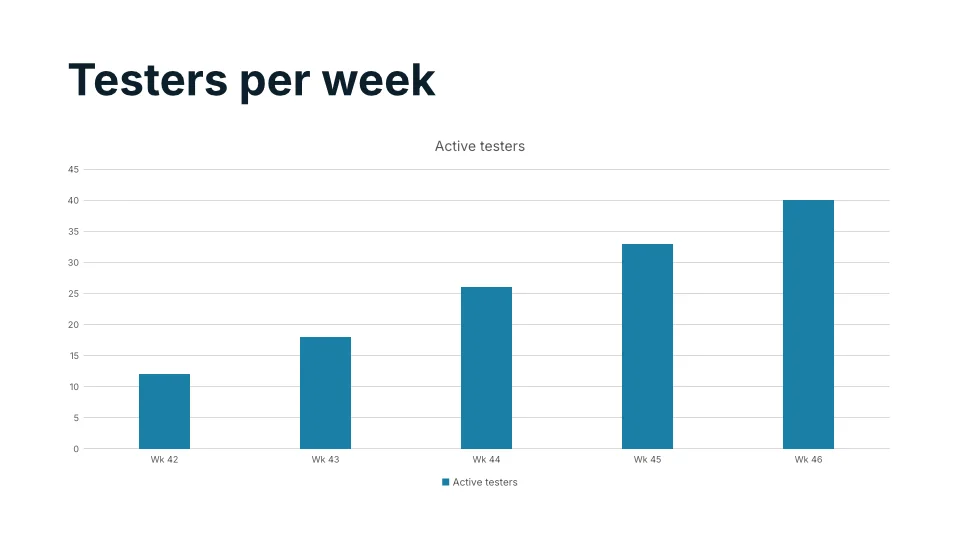
07 把草稿交给人审阅。合并还是丢弃由人决定,没有工具能代劳。
slide_draft_ready → ready
Your draft of `Project update.pptx` is ready for review; the person will merge or discard it.
调用记录
- sheet_inspect (Budget.xlsx, target: {"range":"A1:E7"}, preview: true, scale: 2) ok Opened `Budget.xlsx`: 1926 × 1921
- sheet_commands (Budget.xlsx, query: "set values percentage format") ok No command has every word of `set values percentage format`; 181 have some of them; showing the best 12.
- sheet_run (Budget.xlsx, draft: true, [range.setValues, home.bold, home.fillColor, home.numberFormat]) diagnostics Ran 4 commands on your draft of `Budget.xlsx`; the file is unchanged until the person merges the draft.
- sheet_inspect (Budget.xlsx, target: {"range":"A1:E7"}, draft: true, preview: true, scale: 2) ok Opened your draft of `Budget.xlsx`: 1926 × 1921
- sheet_check (Budget.xlsx, draft: true) diagnostics Checked your draft of `Budget.xlsx`: 1 error, no warnings, no notes.
- sheet_run (Budget.xlsx, draft: true, [cell.set]) ok Ran 1 commands on your draft of `Budget.xlsx`; the file is unchanged until the person merges the draft.
- sheet_inspect (Budget.xlsx, target: {"range":"A1:E7"}, draft: true, preview: true, scale: 2) ok Opened your draft of `Budget.xlsx`: 1926 × 1921
- sheet_draft_ready (Budget.xlsx) ok Your draft of `Budget.xlsx` is ready for review; the person will merge or discard it.
预览
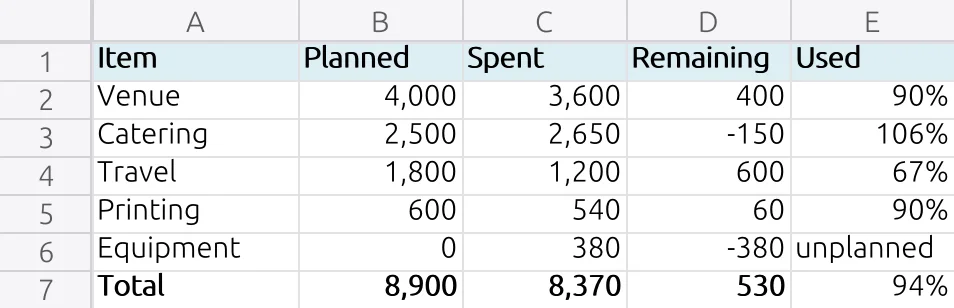
01 打开工作簿看预算表:单元格和公式以 JSON 列出,再加上 kit 渲染出来的这一块区域。
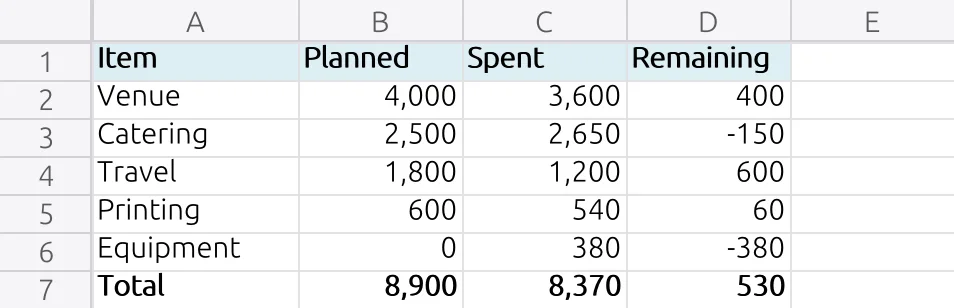
02 在 kit 的命令目录里搜索写入一块单元格和设置百分比格式的命令。
sheet_commands(Budget.xlsx, query: "set values percentage format") · 5 找到
- home.numberFormat Number Format Sets how numbers in a range display: a named format (Currency, Percentage, Short Date, Text…) or a custom format code such as 0.00%.
- range.setValues Set Values Writes a block of values starting at the range's top-left cell, one inner list per row; strings starting with = become formulas.
- pivot.valueSettings Value Field Settings Changes a pivot table value field's summary function, caption or show-as calculation (percent of total, running total…).
- home.conditionalFormat Conditional Formatting Adds a conditional formatting rule to a range (cell value with an operator, formula, text, duplicates, top/bottom, dates, data bar, colour…
- chart.formatSelection Format Selection Sets the colour of one series of a chart, by its 0-based index.
03 要求是:加一列,显示每项计划已经花掉的比例。公式写进草稿,在有人合并之前文件不变。
sheet_run → 4 steps · draft
✓ range.setValues ✓ home.bold ✓ home.fillColor ✓ home.numberFormat
changes: 8 created, 2 changed
+ sheet.formula-error
04 看草稿:Equipment 这一项没有计划金额,比例的公式除以了零。
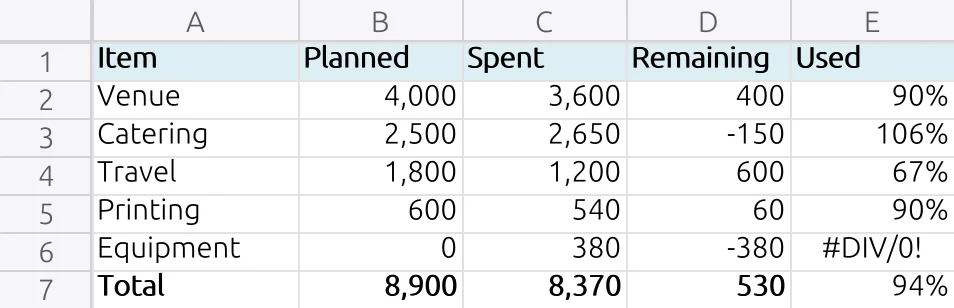
05 检查草稿。kit 用稳定的编码报告这个公式错误,并指明所在的单元格。
sheet_check → 1 error
sheet.formula-error: Sheet1!E6 evaluates to #DIV/0!: =C6/B6
06 给公式加上保护,而不是删掉它:没有计划的项目直接写明。返回结果说这个错误已经解决。
sheet_run → 1 steps · draft
✓ cell.set
changes: 2 changed
− sheet.formula-error (resolved)
07 再看一遍现在渲染出来的草稿。
08 把草稿交给人,由人合并或丢弃。
sheet_draft_ready → ready
Your draft of `Budget.xlsx` is ready for review; the person will merge or discard it.
调用记录
- doc_inspect (Office move.docx, preview: true, maxSize: 1200) ok Opened `Office move.docx`: 692 × 872
- doc_commands (Office move.docx, query: "heading style") ok 5 commands have every word of `heading style`, 54 more some of them; showing the best 12.
- doc_run (Office move.docx, draft: true, [select.range, para.heading1, select.range, para.heading2, select.range, text.newParagraph, text.insert]) ok Ran 7 commands on your draft of `Office move.docx`; the file is unchanged until the person merges the draft.
- doc_check (Office move.docx, draft: true) ok Checked your draft of `Office move.docx`: no errors, no warnings, 2 notes.
- doc_inspect (Office move.docx, draft: true, preview: true, maxSize: 1200) ok Opened your draft of `Office move.docx`: 692 × 872
- doc_draft_ready (Office move.docx) ok Your draft of `Office move.docx` is ready for review; the person will merge or discard it.
预览
01 打开这份备忘:段落以 JSON 列出,每段有序号和稳定的 id,再加上 kit 排出来的页面。
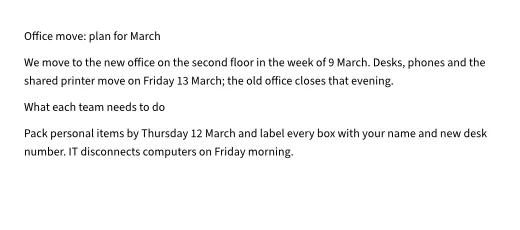
02 在命令目录里搜索标题样式:标题应该是样式,而不只是加粗的文字。
doc_commands(Office move.docx, query: "heading style") · 5 找到
- para.heading1 Heading 1 Applies the Heading 1 style to the selected paragraphs.
- para.heading2 Heading 2 Applies the Heading 2 style to the selected paragraphs.
- para.heading3 Heading 3 Applies the Heading 3 style to the selected paragraphs.
- para.style Apply Style Applies a paragraph style (by name or id, such as Heading 1 or Quote) to the selected paragraphs; styles.list names them.
- design.styleSet Style Set Applies a style set (basic, lines, shaded, casual, centered, minimalist, title) that restyles headings and body text.
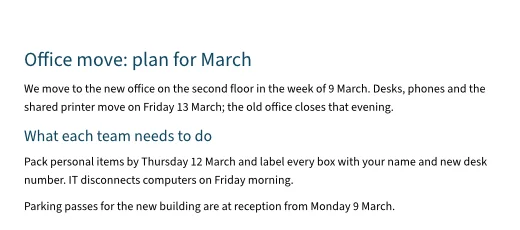
03 要求是:把两个标题设成真正的标题样式,再加一句停车的事。修改写进草稿,在有人合并之前文件不变。
doc_run → 7 steps · draft
✓ select.range ✓ para.heading1 ✓ select.range ✓ para.heading2 ✓ select.range ✓ text.newParagraph ✓ text.insert
changes: 1 created, 3 changed
+ doc.font-substituted
04 检查草稿。唯一的发现是一条提示:这里没有主题字体,用替代字体绘制。文件里的字体不变,所以不需要修正。
doc_check → 2 notes
doc.font-substituted: The font "Aptos" is not available here: its text is drawn with a substitute, so lines may break differently.
doc.font-substituted: The font "Aptos Display" is not available here: its text is drawn with a substitute, so lines may break differently.
05 看现在排出来的草稿:两个标题,以及新加的一段。
06 把草稿交给人,由人合并或丢弃。
doc_draft_ready → ready
Your draft of `Office move.docx` is ready for review; the person will merge or discard it.
调用记录
- pdf_inspect (Site visit notes.pdf, preview: true, maxSize: 1200) ok Opened `Site visit notes.pdf`: 692 × 872
- pdf_commands (Site visit notes.pdf, query: "highlight comment") ok 2 commands have every word of `highlight comment`, 16 more some of them; showing the best 12.
- pdf_run (Site visit notes.pdf, draft: true, [comment_add, comment_add]) ok Ran 2 commands on your draft of `Site visit notes.pdf`; the file is unchanged until the person merges the draft.
- pdf_check (Site visit notes.pdf, draft: true) ok Checked your draft of `Site visit notes.pdf`: no errors, no warnings, 2 notes.
- pdf_inspect (Site visit notes.pdf, draft: true, preview: true, maxSize: 1200) ok Opened your draft of `Site visit notes.pdf`: 692 × 872
- pdf_draft_ready (Site visit notes.pdf) ok Your draft of `Site visit notes.pdf` is ready for review; the person will merge or discard it.
预览
01 打开这份 PDF:页面以 JSON 列出,再加上 kit 渲染出来的第 1 页。
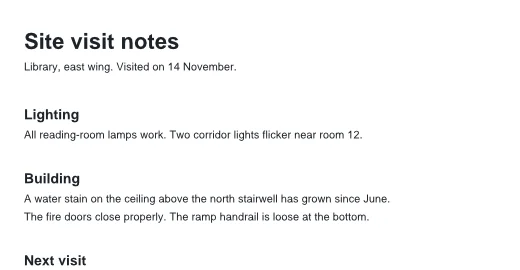
02 在命令目录里搜索批注:高亮和便笺是批注,不改页面上的文字。
pdf_commands(Site visit notes.pdf, query: "highlight comment") · 5 找到
- comment_add Add a comment Add a comment as Acrobat's commenting tools do.
- doc_compare_mark Mark differences as comments Add the differences from other (older) to doc (newer) as comments in doc: highlights over replaced (blue) and inserted (green) text, notes…
- comment_list List comments Every comment (annotation other than links, form widgets and pop-ups) with its page, index, id, type, author, text, date, rectangle,…
- comment_reply Reply to a comment Add a reply to a comment's thread.
- comment_set_status Set a comment's status Set a comment's review status (Acrobat: Set status), recorded as a status reply.
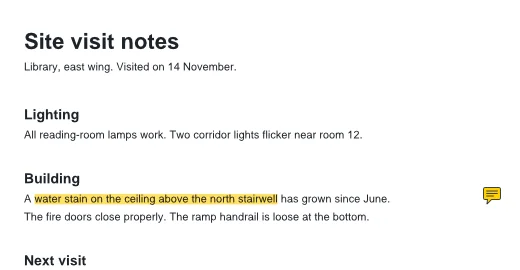
03 要求是:把楼梯间的水渍标出来给修屋顶的人看。高亮按文字在页面上找到位置,便笺写明要做什么。两处都写进草稿。
pdf_run → 2 steps · draft
✓ comment_add ✓ comment_add
changes: 2 created, 1 changed
04 检查草稿。只有提示:文字用的是每个阅读器都自带的标准字体。
pdf_check → 2 notes
pdf.font-not-embedded: The font Helvetica-Bold is not embedded; it is one of the standard 14 fonts, which viewers supply.
pdf.font-not-embedded: The font Helvetica is not embedded; it is one of the standard 14 fonts, which viewers supply.
05 再看一遍现在渲染出来的页面:高亮和便笺图标。
06 把草稿交给人,由人合并或丢弃。
pdf_draft_ready → ready
Your draft of `Site visit notes.pdf` is ready for review; the person will merge or discard it.
调用记录
- vector_inspect (Open day card.kvector, preview: true) ok Opened `Open day card.kvector`: 800 × 500
- vector_commands (Open day card.kvector, query: "set fill rectangle") ok No command has every word of `set fill rectangle`; 216 have some of them; showing the best 12.
- vector_run (Open day card.kvector, draft: true, [paint.setFill, shape.rectangle, text.create]) ok Ran 3 commands on your draft of `Open day card.kvector`; the file is unchanged until the person merges the draft.
- vector_run (Open day card.kvector, draft: true, [paint.setFill, paint.setStroke]) ok Ran 2 commands on your draft of `Open day card.kvector`; the file is unchanged until the person merges the draft.
- vector_check (Open day card.kvector, draft: true) ok Checked your draft of `Open day card.kvector`: the kit found nothing wrong.
- vector_inspect (Open day card.kvector, draft: true, preview: true) ok Opened your draft of `Open day card.kvector`: 800 × 500
- vector_draft_ready (Open day card.kvector) ok Your draft of `Open day card.kvector` is ready for review; the person will merge or discard it.
预览
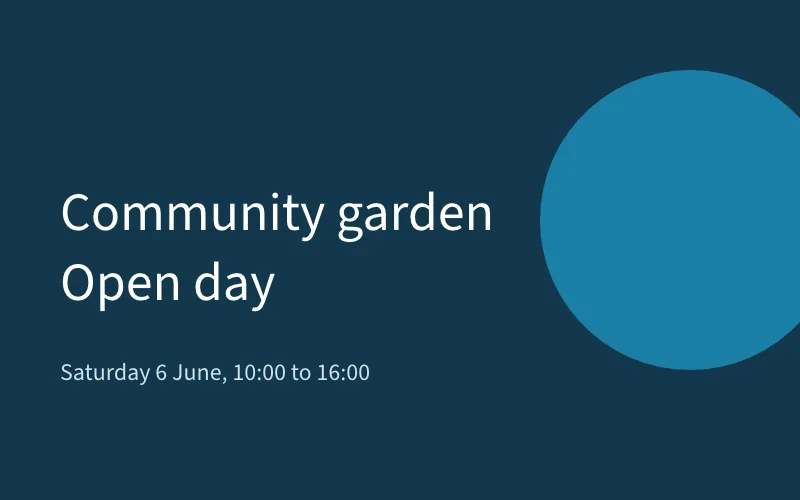
01 打开这张卡片:画板、图层和对象以 JSON 列出,每个都有 id,再加上 kit 渲染出来的卡片。
02 在命令目录里搜索填充和矩形的命令。
vector_commands(Open day card.kvector, query: "set fill rectangle") · 5 找到
- object.slice.setRect Set Slice Rectangle Moves or resizes a user slice.
- paint.setFill Fill Sets the fill of the selection or ids (or the default fill) to a colour, a swatch, a gradient, a pattern or none; a global or spot swatch…
- path.setFillRule Fill Rule Sets the fill rule (non-zero or even-odd) of the selected or given paths and compound paths.
- shape.rectangle Rectangle Draws a rectangle at x, y with width and height (optional corner radius and rotation about its centre) in the current layer with the…
- path.rectCut Rectangle Cut Crops the selected paths to a rectangle as real geometry (not a clipping mask).
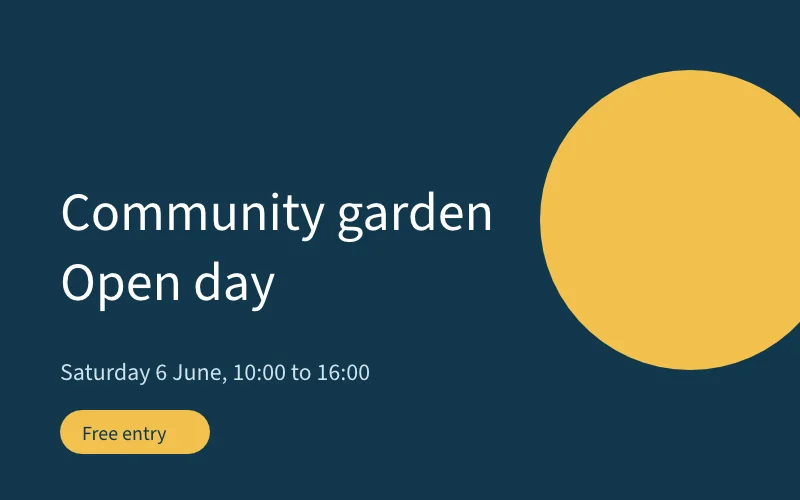
03 要求是:把圆改成暖色的太阳,再加一个“Free entry”的标签。修改写进草稿,在有人合并之前文件不变。
vector_run → 3 steps · draft
✓ paint.setFill ✓ shape.rectangle ✓ text.create
changes: 2 created, 1 changed
04 用上一次返回的 id,给新标签填上太阳的颜色。
vector_run → 2 steps · draft
✓ paint.setFill ✓ paint.setStroke
changes: 1 changed
05 检查草稿:没有对象跑出画板,也不缺字体。
vector_check → 没有诊断
06 再看一遍现在渲染出来的卡片。
07 把草稿交给人,由人合并或丢弃。
vector_draft_ready → ready
Your draft of `Open day card.kvector` is ready for review; the person will merge or discard it.
调用记录
- docx_inspect (Report.docx) ok 3 body paragraphs; 1 body tables.
- docx_commands (Report.docx, query: "set text") ok paragraph.set-text, table.set-cell
- docx_run (Report.docx, [paragraph.set-text, table.set-cell]) error not-found at step 1, rolled back 1 No such table cell; call docx_inspect for row and column indexes counted from 0.
- docx_run (Report.docx, [paragraph.set-text, table.set-cell, table.set-cell]) ok 3 steps, saved
- docx_check (Report.docx) ok 0 diagnostics
- docx_inspect (Report.docx) ok 3 body paragraphs; 1 body tables.
预览
01 动手之前先把文档读成 JSON。
| Task | Status |
| Collect figures | In progress |
| Write summary | Not started |
02 在命令目录里搜索,而不是给每个命令一个工具。
docx_commands(Report.docx, query: "set text") · 2 找到
- paragraph.set-text Set paragraph text Replace one body paragraph's inline content and run formatting with plain text; keep its paragraph style.
- table.set-cell Set table cell text Replace a body table cell's content with plain text. Merged cells are refused.
03 一次行号写错的修改(表格只有第 0 到 2 行)。kit 拒绝它,给出错误码和修正提示,并把已经成功的那一步也撤回。
| Task | Status | |
| Collect figures | In progress | |
| Write summary | Not started | |
| 3 | ? |
|---|
docx_run → not-found · step 1
No such table cell; call docx_inspect for row and column indexes counted from 0.
已撤回: paragraph.set-text (step 0)
04 地址改对后再做一次。所有步骤一起生效,文件只保存一次。
| Task | Status |
| Collect figures | Done |
| Write summary | In review |
docx_run → 3 steps · saved
✓ paragraph.set-text ✓ table.set-cell ✓ table.set-cell
Report.docx → 4512d38
05 让 kit 检查保存后的文件。
| Task | Status |
| Collect figures | Done |
| Write summary | In review |
docx_check → 没有诊断
Package opened. No layout, style, accessibility or fidelity checks are implemented at this basic tier.
06 再读一遍,确认改了什么。
| Task | Status |
| Collect figures | Done |
| Write summary | In review |
一套协议,16 类文件
这些是参考实现里的 kit,由协议的维护者 Kition 开发,源码都是公开的。khp 仓库里另有一个包装 python-docx 的小示例 kit。任何人都可以为某一类文件做一个 kit: 实现一个 kit →
- 笔记 basic .md.markdown
- 数据表 basic .ktable
- 白板 basic .kboard
- 文档 basic .docx 可读 .html .htm
- 表格 basic .xlsx.xlsm 可读 .xltx .xltm .xls .xlt +5
- 幻灯片 basic .kslide.pptx
- PDF basic .pdf
- 网页 basic .html.htm
- 图片 basic .psd.psb.kphoto
- 矢量图 basic .kvector 可读 .svg .ai .eps
- 排版 basic .klayout 可读 .idml
- 界面设计 agent-ready .kdesign 可读 .fig .sketch
- 视频剪辑 basic .kfilm
- 动态图形 basic .kmotion
- CAD 图纸 basic .dxf
- 3D 场景 basic .kscene
数据来自各 kit 的 kit.json,读取于 2026-11-18 · github.com/KitionAI/kition-<kit>
01 · 缺口
agent 写代码有 harness,处理文件没有。
编程 agent 能做实事,是因为它的 harness 让模型能读代码、改代码、运行、测试,出错时回退。幻灯片、表格、文档、PDF、图片、视频工程和图纸都没有这样的环境。kit 就是某一类文件的 harness。
01 观察
代码 读源码
今天的文件 为存储设计的格式
文档的 JSON、带类型的对象、渲染出来的预览
_inspect_query_hit
02 操作
代码 编辑、跑 shell
今天的文件 凭猜测改格式的脚本
带参数 schema 的命令;成批的对象编辑
_commands_run_batch
03 执行
代码 编译器、运行时
今天的文件 计算和排版锁在桌面软件里
kit 自己的引擎重新计算、排版、渲染
引擎
04 验证
代码 测试、类型检查
今天的文件 没有东西告诉它改得对不对
kit 报告的文档诊断
_check
05 恢复
代码 分支、回退
今天的文件 改动直接落进文件
由人审阅并合并的草稿
_draft_ready人来合并
KHP 只规定 AI agent 怎样使用 kit。kit 内部怎么实现(引擎、数据模型、编辑器、存储)由它自己决定。 为什么需要 KHP →
02 · 证据
试点测到了什么
khp-bench 让 agent 做同样的文件任务,分别通过 KHP kit、同一引擎上“一个命令一个工具”的扁平 MCP 服务器,以及普通 Python 脚本,然后给它留下的文件打分。
这些是试点结果,不是完成的评测:任务少,大多是一个模型、一个 agent harness。只改一个文件的小修改,工具层不改变成功率。评测由协议的维护者自己做,参考实现也出自维护者。 看局限 →
03 · 协议
KHP 规定了什么
三个角色。kit 是某一类文件的 MCP 服务器,在一个工作区文件夹上启动,带一份清单。agent harness 运行模型、它的工具和循环,通过 MCP 连接 kit。人启动 agent,审阅它的草稿,决定合并或丢弃。
- 01 request 人提出要改 plan.gantt。
- 02 gantt_inspect → document JSON agent 把计划读成 JSON。
- 03 gantt_commands → schemas 找到要用的命令。
- 04 gantt_run → ok · draft 在文件旁的草稿里移动三个任务。
- 05 gantt_check → dependency-cycle · fix 检查报告一个依赖环,并给出修复提示。
- 06 gantt_run → ok 执行修复。
- 07 gantt_check → no errors 再检查一次:没有错误。
- 08 gantt_draft_ready → ready 请人审阅草稿。
- 09 review 人对比草稿和文件。
- 10 merge 只有人能合并。agent 没有合并工具。
A3 · A22 · A16
工具
每个 kit 都提供同一组工具,不管它有多少命令。可选的工具只在 kit 具备条件时提供。
- <prefix>_inspectobserve
- _commands · _runact
- _checkverify
- _create · _exportact
- _draft_ready · _draft_reopenrecover
- _query · _batch · _hit可选
A18 · A21
结果
文档的 JSON、渲染预览、带稳定编码的诊断,以及结构化的错误码。
diagnostic {
  code      "slide.text-overflow"
  severity  "warning"
  target    { slide: 3 }
  message   …
  fix?      { command, params }
}
A14 · A11 · A29 · A10
规则
- A14只有人能合并或丢弃草稿。
- A11agent 的修改记在发起它的人名下。
- A29文件参数不出工作区。
- A10每次调用都有记录。
K2 · K19 · K20
清单和等级
一个最小的 kit.json(同时作为 MCP 资源提供)写明 kit 声明的等级,由 khp check 测试。
"khp": "1.0",
"id": "org.example.docx-python",
"agent": { "prefix": "docx", … },
"level": "basic"
三个等级,每级包含前一级
定义见 工具页第 10 节; 等级和 khp check 讲怎样测试。
-
Basic
basicinspect、commands、run、check;每个面向 agent 的命令都有 schema;结构化错误;安全规则。给现有的文件库包一层就够。
-
Agent-ready
agent-ready不开编辑器也能工作;真实的预览和带目录的检查;新建和导出;有对象模型时提供 query 和 batch;不联网。
-
Agent-ready complete
agent-ready-complete分页类 kit 的排版回答;给模型的使用指南;只改动所指对象的编辑;在沙箱里运行。
04 · 案例
用起来是什么样
examples/docx-python · basic
一个现成的库变成 kit
docx_run → ok · 3 steps, saved
khp 的公开示例把 python-docx 包成一个 MCP 服务器:六个工具、basic 等级、要么全做要么不做的编辑,路径出不了工作区。
寻址 · A46
回头改前面那一页
当前页变了,id 还在用
多轮对话回到前面某一页时,依赖隐藏“当前页”的接口会改错页。绝对地址避免了这个问题。
统一入口 · kit_<action>
三种文件,一组工具
kit_inspect → 按扩展名分发
幻灯片、表格和文档共用一组固定的工具。上下文里的工具定义不随命令数增长。
05 · 开始
从你的角色开始
A
把 kit 接到你的 agent
把 kit 注册成 MCP 服务器。下面用的是 khp 的示例 kit,先按它的 README 装好。
Claude Code
claude mcp add docx -- "$KHP_PYTHON_ENV/bin/python" -B \
  "$REPO_ROOT/examples/docx-python/server.py" \
  --workspace "$WORKSPACE" --actor "Your Name"
Codex
# ~/.codex/config.toml (absolute paths)
[mcp_servers.docx]
command = "/path/to/venv/bin/python"
args = ["-B", "/path/to/khp/examples/docx-python/server.py",
        "--workspace", "/path/to/workspace", "--actor", "Your Name"]
其他 MCP 客户端
{
  "mcpServers": {
    "docx": {
      "command": "/path/to/venv/bin/python",
      "args": ["-B", "/path/to/khp/examples/docx-python/server.py",
               "--workspace", "/path/to/workspace", "--actor", "Your Name"]
    }
  }
}B
做一个 kit
把你的文件库包一层,再用 khp check 测试。检查工具还没有发布到 npm,要从 khp 仓库构建。
git clone https://github.com/kitharness/khp && cd khp
pnpm --dir tools/conformance install --frozen-lockfile
pnpm --dir tools/conformance build
node tools/conformance/dist/cli.js check \
  --kit "my-kit --workspace {workspace}" \
--package <kit-package> --level basic06 · 状态
KHP 现在的状态
- 版本
- KHP 1.1, edition 2026.11, draft
- 状态
- 开源的协议草案
- 来源
- 在公开仓库 kitharness/khp 中开发。本站的规范页面复制自提交
70fab29(2026-11-16),只有英文。 - 一致性
- khp check 在同一个仓库里,还没有发布到 npm。
- 维护者
- Kition,它也是参考实现的开发者。协议打算以后移交给中立的基金会。